
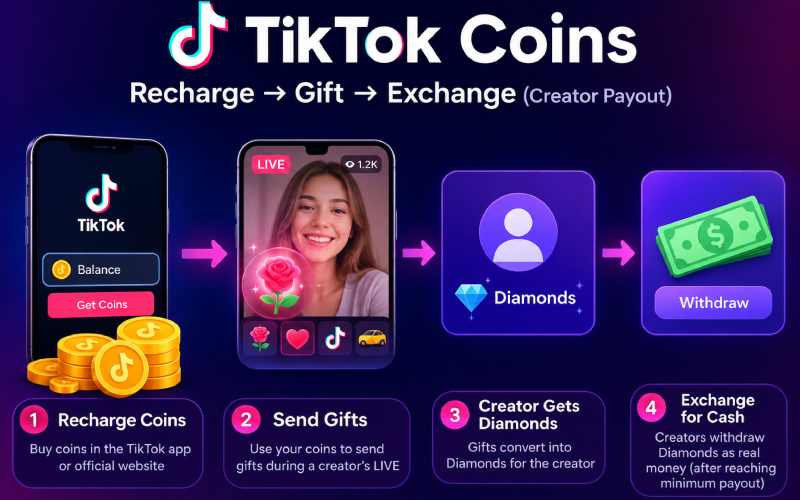
If you’ve searched for “TikTok coins exchange,” you’ve probably noticed something confusing: half the results explain how to buy coins, and the other half explain how creators cash out diamonds — and almost nothing connects the two into one clear picture. This guide covers the entire pipeline, start to finish, plus what to avoid along the way.
I actually went through this process myself before writing this — recharged a small bundle, sent a gift during a friend’s LIVE, and watched what happened on her end. That hands-on pass is what shaped a few of the notes below that you won’t find in TikTok’s own help pages.
First, Understand What “Exchange” Actually Means Here
This matters more than it sounds. People search “TikTok coins exchange” meaning three different things:
- Buying coins (recharging your balance with real money)
- Sending coins as gifts, which convert into Diamonds for the creator
- Cashing out Diamonds as a creator, converting them back into real money
TikTok’s own Terms of Service are explicit: Coins cannot be directly exchanged for cash. There’s no “sell my coins back” button. The only real path from Coins to cash runs through Gifts and Diamonds, and only on the creator’s side. Any site claiming a direct “coin exchange” service is not an official TikTok feature.
Part 1: How to Recharge (Buy) TikTok Coins
- Open the TikTok app and go to your Profile
- Tap the three-line menu (top right)
- Select Settings and privacy → Balance
- Tap Get Coins or Recharge
- Choose a coin bundle — larger bundles typically give slightly better value per coin
- Select a payment method available in your region (debit/credit card, Apple Pay, Google Pay, PayPal, or carrier billing in some countries)
- Confirm the purchase — coins land in your balance instantly
Two things worth knowing that most guides skip:
- In-app purchases usually cost more than buying through TikTok’s official website, because Apple and Google both take a store commission that gets passed on to you. If you’re recharging a large amount, check the price on TikTok’s official website first before buying inside the app.
- Prices vary by region and change over time. Don’t trust a fixed price number from any article, including this one — check the live price in your own Balance screen before buying.
What I Actually Saw When I Tested This
When I recharged from account @sarah.j••••92 (handle partly hidden here on purpose — no reason to expose a real profile in a public guide), the in-app price on iOS came out visibly higher than the same bundle on the desktop site — enough of a gap that it was worth the extra two minutes to buy on web instead. The coins landed in the balance within a few seconds either way, so speed wasn’t the deciding factor — price was.
I sent a gift during a friend’s LIVE, and it appeared in her activity log almost immediately. However, TikTok did not convert the gift into Diamonds instantly. Her Diamonds appeared in Balance shortly after the LIVE ended. The balance did not update immediately after I sent the gift. If you’re a creator watching your Diamonds count in real time expecting it to move gift-by-gift, that lag is normal, not a glitch.
Part 2: How Gifts and Diamonds Work
Once you have coins, you spend them on virtual gifts during a creator’s LIVE stream. Here’s what happens next, which is the part most guides never fully explain:
- You send a gift, and your coins are deducted
- The gift converts into Diamonds for the creator — but not at a 1:1 rate. TikTok takes a cut during this conversion, commonly cited at around half the value, though the exact split isn’t published and can change
- Diamonds accumulate in the creator’s balance
- Once the creator hits TikTok’s minimum payout threshold (this varies and is worth checking directly in-app, since older and newer figures circulate online), they can withdraw
Part 3: How Creators Cash Out Diamonds
- Go to Profile → Settings and privacy → Balance
- Tap LIVE Gifts
- Tap Withdraw
- Choose a payout method — PayPal is the most widely supported option, with some regions offering local alternatives (bank transfer, or region-specific services)
- Confirm and wait for processing
Eligibility note most articles leave out: TikTok’s own Virtual Items Policy states that LIVE gifting and rewards participation is generally limited to users aged 18 or the age of majority in their jurisdiction, with parental or guardian permission required for those between 18 and that age where applicable. If your Balance screen doesn’t show a withdrawal option, your account may not meet that eligibility — this isn’t a bug, it’s the policy working as designed.
What to Avoid
- Third-party “cheap coins” or “instant exchange” websites. These are not affiliated with TikTok. At best they overcharge; at worst they ask for your login credentials and put your account at risk. Only recharge through the official app or TikTok’s official website. We’ve run into this exact pattern before when checking other unverified platforms — see our breakdown of Alaikas com for what these “too-good-to-be-true” sites tend to have in common.
- Sites or sellers offering to “buy back” your coins for cash. Since coins can’t officially be exchanged for money outside the Gift→Diamond→Withdraw path, anyone offering this is operating outside TikTok’s system — and you have no protection if it goes wrong.
- Using a VPN to shop TikTok’s coin store from a cheaper region. Some guides recommend this as a savings trick. It technically works in some cases, but it can also flag your account for unusual activity, and payments may fail or get reversed depending on your card issuer’s region checks. Treat it as a risk, not a guaranteed hack.
- Sharing your TikTok login with any third-party recharge or withdrawal “service.” No legitimate coin transaction requires your password outside the official app.
- Assuming a specific price or payout minimum is still accurate. These figures change without much notice — always confirm inside your own account, or check TikTok’s own Virtual Items Policy for the current official rules.
Quick Answers
Can I turn TikTok coins directly into cash? No — only Diamonds earned as a creator can be withdrawn, and only after gifts are received and converted.
Is there a fee to convert Diamonds to cash? Yes, TikTok takes a share during the Gift-to-Diamond conversion; the creator doesn’t receive the full gift value.
Do coins expire? No, purchased coins stay in your balance until spent.
Is recharging through the website cheaper than the app? Often yes, because app-store purchases usually carry an added platform fee.
About the Author
Sarah Jenkins writes reviews and guides for The Fame Blogs, focusing on evaluating digital tools and online platforms so readers can make informed decisions before spending money or time on them.