
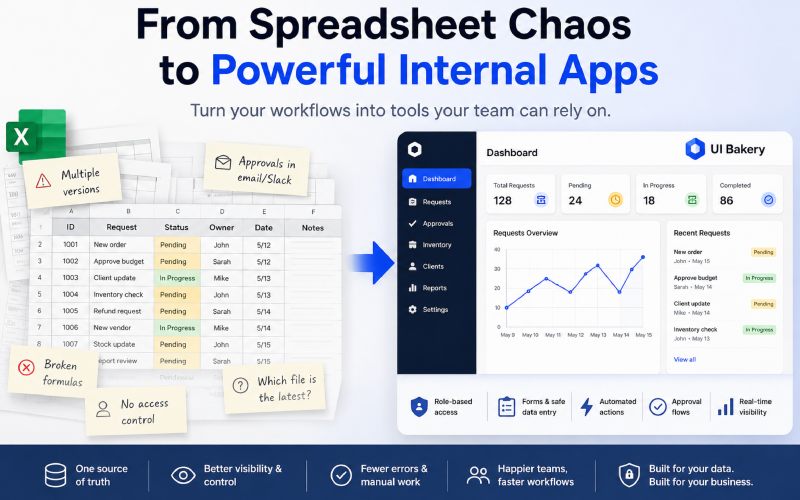
Most internal tools do not start as software projects. They start as spreadsheets. A team needs to track orders, approve requests, manage inventory, monitor clients, or coordinate operations, and Excel becomes the fastest possible solution. It works because it is familiar, flexible, and available immediately.
The problem begins when the spreadsheet stops being a temporary workspace and becomes the main operating layer for the business. At that point, the issue is no longer “Excel is messy.” The real issue is that critical workflows are running without proper interfaces, permissions, automations, or reliable data structure. Teams are not just using a spreadsheet anymore; they are maintaining a fragile internal system.
Where Excel Starts Holding Teams Back
Excel is excellent for modeling, calculations, quick planning, and early workflow design. It is not designed to manage complex operational processes across many users, roles, and data sources. When companies grow, teams usually add more tabs, formulas, comments, filters, and manual rules instead of moving the workflow into a better system.
The usual breaking points are predictable:
- Teams work in different file versions.
- Approvals happen manually in email or Slack.
- Managers lack real-time visibility, making it harder to coordinate operations effectively.
- Access control becomes difficult.
- Formulas break and reporting becomes unreliable.
- Employees copy data between Excel, CRM, databases, and internal systems.
These problems are not caused by bad teams. They happen because the workflow has outgrown the tool that originally helped it move fast.
Why UI Bakery Approaches This Differently
UI Bakery is built around a practical idea: companies should not need a six-month engineering project just to turn operational data into usable internal software. Many teams already have the logic of the workflow inside spreadsheets. What they lack is a proper interface, controlled access, connected data, and a faster way to evolve the process.
With UI Bakery, teams can build internal tools, admin panels, dashboards, approval systems, and CRUD apps on top of real business data. This includes SQL databases, APIs, GraphQL, and spreadsheet-based workflows. The value is not only in “making an app.” The value is in giving teams a structured way to work with data without forcing them to live inside raw tables.
From Spreadsheet to Internal App
This is where the idea of Excel to App becomes important. Instead of treating Excel as something that must be thrown away, UI Bakery helps teams turn spreadsheet-driven processes into structured applications. A spreadsheet can become the starting point for a real internal tool with forms, dashboards, user roles, actions, and workflow logic.
For example, an inventory spreadsheet can become an operations dashboard. A client tracking file can become a CRM-like internal app. A request approval sheet can become a proper workflow tool with status updates and role-based views. The business logic stays recognizable, but the daily experience becomes more reliable.
What Teams Actually Gain
The biggest improvement is not visual polish. It is operational control. Once a workflow moves from spreadsheet chaos into an internal app, teams can define who sees what, how data is updated, and which actions are available to each user.
UI Bakery helps teams add:
- Role-based access and permissions.
- Forms for safer data entry.
- Dashboards for managers and operators.
- Automated actions connected to APIs or databases.
- Approval flows and status tracking.
- Interfaces built around real workflows, not generic templates.
- AI-assisted app generation for faster first versions.
This matters because internal software should reduce coordination work. If employees still need to ask where the latest file is, who approved the change, or which number is correct, the system is not solving the real problem.
Why This Matters for Growing Companies
Growing companies often delay internal tooling because engineering teams are focused on customer-facing products. That is understandable, but it creates a backlog of operational pain. Teams keep patching spreadsheets because there is no time to build proper software.
UI Bakery gives companies a middle path. It allows technical and semi-technical teams to create production-grade internal tools faster, while still keeping enough control for real business use. For companies that need self-hosting, live data connections, and secure workflows, this is much closer to internal software than a simple no-code spreadsheet wrapper.
Final Thoughts
Excel is not the enemy. In many companies, it is where the best operational ideas begin. The problem starts when those ideas become business-critical and still depend on manual updates, fragile formulas, and scattered file versions.
UI Bakery helps teams move from spreadsheet-based work to structured internal apps without rebuilding everything from scratch. That is the real opportunity: not replacing Excel for the sake of it, but turning the workflows that already matter into tools people can actually rely on.